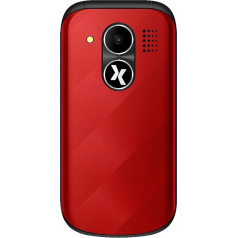
Primo 215 by Doro; large button mobile phone with table charging station 1.7 inch (4.3 cm) TFT display Bluetooth function Emergency call button Box contents: mobile phone, battery, power supply, USB cable, headset, instruction manual › See more product details; Product description Product Description Primo 215 by Doro - Large Button Mobile Phone with Table Charging Station Welcome to the brand new line of Doro, the leading manufacturer of easy calling phones. Our new Primo by Doro products are just as reliable as our very popular Doro PhoneEasy mobile phones and offer you just as many great features. Separate buttons, a discreetly integrated emergency call button with the unique function of easily switching to hands-free calling during a conversation and even a convenient desktop charging station - all at fantastic value for money. Emergency call button. Colour display. Bluetooth FM Radio Strong vibration alarm. Display The Primo 215 by Doro is equipped with a 1.7 inch (4.3 cm) colour display. The resolution of the display is 160 x 128 pixels. On the display you can easily Date and time Battery charge status. Reception Strength read. Answer and hang up calls. Answering calls is easy with the button with the green handset. If you press the button with the red earphone, a call will end. If you press this button without answering a call, the call will be rejected. Large buttons. The buttons of the Primo 365 by Doro are extra large and therefore the buttons can be easily pressed and the operation of the mobile phone is considerably easier. The high-contrast printed buttons (white on black) are an additional aid for better reading and operation of the keys. Emergency call button. With the emergency call button, you can easily call pre-set numbers in an emergency. Press the emergency call button on the back of the mobile phone for 3 seconds, a loud beep will sound. If the alarm is not deactivated beforehand (in case of possible false alarm), an SMS text message will be sent to all phone numbers stored in the emergency number list. The second step is that the contacts are called one by one. This sequence is repeated three times until a call is answered or the red handset button is pressed. However, if the emergency button is pressed during a call, the hands-free function is automatically activated. Bluetooth The Bluetooth function allows you to connect to other Bluetooth-compatible devices such as headsets. The function can also be used for data transfer - so you can easily exchange pictures with friends and acquaintances. Vibration alarm. The mobile phone is also equipped with a vibration alarm. Here the Hany vibrates in addition to the call or SMS sound when incoming calls or SMS. In the settings, you can also make the phone vibrate even though it is set to \; Product description Product Description Primo 215 by Doro - Large Button Mobile Phone with Table Charging Station Welcome to the brand new line of Doro, the leading manufacturer of easy calling phones. Our new Primo by Doro products are just as reliable as our very popular Doro PhoneEasy mobile phones and offer you just as many great features. Separate buttons, a discreetly integrated emergency call button with the unique function of easily switching to hands-free calling during a conversation and even a convenient desktop charging station - all at fantastic value for money. Emergency call button. Colour display. Bluetooth FM Radio Strong vibration alarm. Display The Primo 215 by Doro is equipped with a 1.7 inch (4.3 cm) colour display. The resolution of the display is 160 x 128 pixels. On the display you can easily Date and time Battery charge status. Reception Strength read. Answer and hang up calls. Answering calls is easy with the button with the green handset. If you press the button with the red earphone, a call will end. If you press this button without answering a call, the call will be rejected. Large buttons. The buttons of the Primo 365 by Doro are extra large and therefore the buttons can be easily pressed and the operation of the mobile phone is considerably easier. The high-contrast printed buttons (white on black) are an additional aid for better reading and operation of the keys. Emergency call button. With the emergency call button, you can easily call pre-set numbers in an emergency. Press the emergency call button on the back of the mobile phone for 3 seconds, a loud beep will sound. If the alarm is not deactivated beforehand (in case of possible false alarm), an SMS text message will be sent to all phone numbers stored in the emergency number list. The second step is that the contacts are called one by one. This sequence is repeated three times until a call is answered or the red handset button is pressed. However, if the emergency button is pressed during a call, the hands-free function is automatically activated. Bluetooth The Bluetooth function allows you to connect to other Bluetooth-compatible devices such as headsets. The function can also be used for data transfer - so you can easily exchange pictures with friends and acquaintances. Vibration alarm. The mobile phone is also equipped with a vibration alarm. Here the Hany vibrates in addition to the call or SMS sound when incoming calls or SMS. In the settings, you can also make the phone vibrate even though it is set to \; Product Description Primo 215 by Doro - Large Button Mobile Phone with Table Charging Station Welcome to the brand new line of Doro, the leading manufacturer of easy calling phones. Our new Primo by Doro products are just as reliable as our very popular Doro PhoneEasy mobile phones and offer you just as many great features. Separate buttons, a discreetly integrated emergency call button with the unique function of easily switching to hands-free calling during a conversation and even a convenient desktop charging station - all at fantastic value for money. Emergency call button. Colour display. Bluetooth FM Radio Strong vibration alarm. Display The Primo 215 by Doro is equipped with a 1.7 inch (4.3 cm) colour display. The resolution of the display is 160 x 128 pixels. On the display you can easily Date and time Battery charge status. Reception Strength read. Answer and hang up calls. Answering calls is easy with the button with the green handset. If you press the button with the red earphone, a call will end. If you press this button without answering a call, the call will be rejected. Large buttons. The buttons of the Primo 365 by Doro are extra large and therefore the buttons can be easily pressed and the operation of the mobile phone is considerably easier. The high-contrast printed buttons (white on black) are an additional aid for better reading and operation of the keys. Emergency call button. With the emergency call button, you can easily call pre-set numbers in an emergency. Press the emergency call button on the back of the mobile phone for 3 seconds, a loud beep will sound. If the alarm is not deactivated beforehand (in case of possible false alarm), an SMS text message will be sent to all phone numbers stored in the emergency number list. The second step is that the contacts are called one by one. This sequence is repeated three times until a call is answered or the red handset button is pressed. However, if the emergency button is pressed during a call, the hands-free function is automatically activated. Bluetooth The Bluetooth function allows you to connect to other Bluetooth-compatible devices such as headsets. The function can also be used for data transfer - so you can easily exchange pictures with friends and acquaintances. Vibration alarm. The mobile phone is also equipped with a vibration alarm. Here the Hany vibrates in addition to the call or SMS sound when incoming calls or SMS. In the settings, you can also make the phone vibrate even though it is set to \
|