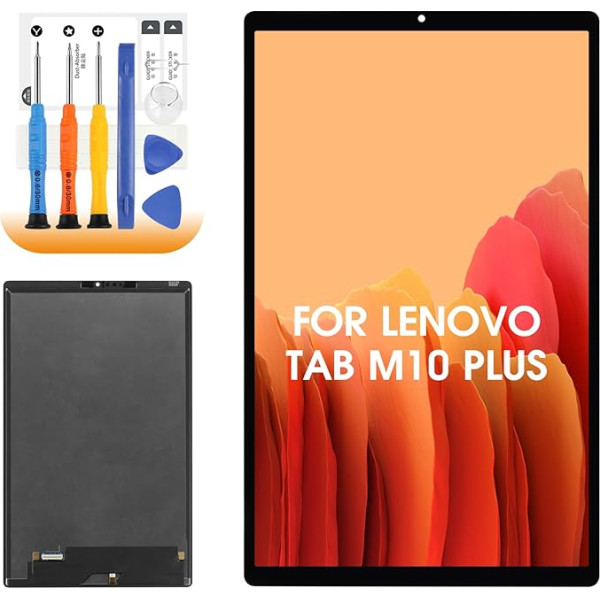
LCD Screen for Lenovo TB-X606:10.3 inch Model TB-X606 TB-X606F, TB-X606X, TB-X606V, LCD Screen for Lenovo Tab M10 Plus, before placing an order TB-X606 replacement screen, please check the model number of your tablet. You can check your specific model under \; Product description REPLACEMENT SEASON DISPLAY - Choose AGCUT display. LCD Display for Lenovo Tab M10 Plus TB-X606 TB-X606F TB-X606X TB-X606V 10.3 inch replacement screen, please confirm the model of your tablet before purchase to avoid unnecessary loss. Package includes: 1 x LCD Screen for LenovoTabTB-X606 The screen is clear, colourful and touch-sensitive, comparable to the quality of the original screen, so you can regain a real and vivid viewing experience. 1 x Installation Kit: Each part has been carefully selected and tested for its quality and is designed to meet the needs of removal and installation of the device, which makes it easier to replace the screen. Installation Notes: (1) Please check the quality of the screen before installation, if you have any problems, please contact us in time, do not force the installation on the tablet. (2) Although our replacement screen for Lenovo Tab M10 Plus TB-X606 is of high quality, the texture is fragile. During the installation process, make sure that your hands remain stable and move gently to avoid normal use of the screen being affected by negligence. (3) After installing the screen, check the display effect, including the normal brightness and colour, whether there are bad or bright points and whether the touch function is sensitive and accurate. If you have any problems, please feel free to contact us, we will offer you satisfactory solutions.; Product description REPLACEMENT SEASON DISPLAY - Choose AGCUT display. LCD Display for Lenovo Tab M10 Plus TB-X606 TB-X606F TB-X606X TB-X606V 10.3 inch replacement screen, please confirm the model of your tablet before purchase to avoid unnecessary loss. Package includes: 1 x LCD Screen for LenovoTabTB-X606 The screen is clear, colourful and touch-sensitive, comparable to the quality of the original screen, so you can regain a real and vivid viewing experience. 1 x Installation Kit: Each part has been carefully selected and tested for its quality and is designed to meet the needs of removal and installation of the device, which makes it easier to replace the screen. Installation Notes: (1) Please check the quality of the screen before installation, if you have any problems, please contact us in time, do not force the installation on the tablet. (2) Although our replacement screen for Lenovo Tab M10 Plus TB-X606 is of high quality, the texture is fragile. During the installation process, make sure that your hands remain stable and move gently to avoid normal use of the screen being affected by negligence. (3) After installing the screen, check the display effect, including the normal brightness and colour, whether there are bad or bright points and whether the touch function is sensitive and accurate. If you have any problems, please feel free to contact us, we will offer you satisfactory solutions.; REPLACEMENT SEASON DISPLAY - Choose AGCUT display. LCD Display for Lenovo Tab M10 Plus TB-X606 TB-X606F TB-X606X TB-X606V 10.3 inch replacement screen, please confirm the model of your tablet before purchase to avoid unnecessary loss. Package includes: 1 x LCD Screen for LenovoTabTB-X606 The screen is clear, colourful and touch-sensitive, comparable to the quality of the original screen, so you can regain a real and vivid viewing experience. 1 x Installation Kit: Each part has been carefully selected and tested for its quality and is designed to meet the needs of removal and installation of the device, which makes it easier to replace the screen. Installation Notes: (1) Please check the quality of the screen before installation, if you have any problems, please contact us in time, do not force the installation on the tablet. (2) Although our replacement screen for Lenovo Tab M10 Plus TB-X606 is of high quality, the texture is fragile. During the installation process, make sure that your hands remain stable and move gently to avoid normal use of the screen being affected by negligence. (3) After installing the screen, check the display effect, including the normal brightness and colour, whether there are bad or bright points and whether the touch function is sensitive and accurate. If you have any problems, please feel free to contact us, we will offer you satisfactory solutions.
|