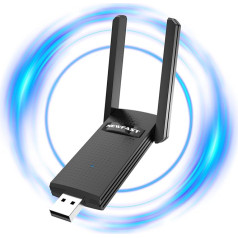
High Speed: Simply plug the adapter into the USB port to connect wirelessly to the network or create a hotspot. With a wireless connection speed of up to 100 Mbps, you can enjoy web experiences such as surfing the Internet, chatting or playing videos online. Superior coverage: Built-in 4G / 3G + WiFi antenna for optimal coverage and reliability, increased signal strength, so you can enjoy reliable wireless connectivity anytime, anywhere. Sharing function: Share up to 8 WiFi users on the Internet connection and enjoy sharing fun with family and friends. Not applicable for Win8 and Macbook. Large memory: supports up to 32GB micro SD memory expansion (not included). Plug and Play: This network card must be plugged into a SIM card to use it, it comes without card. Plug in the card, as long as there is power, you can easily access the Internet, very convenient. › See more product details; Product description The frequency band used in this product is LTE-FDD:B1/B3, if you find that there is no signal 1. Please check if the SIM card is inserted correctly (maybe the SIM card is inserted in the wrong place in the memory card) 2. The SIM card is not open/not activated, there is no data traffic, so the signal of the SIM card cannot be broadcast. 3. The band of the SIM card and the device do not match: you need to change the SIM card to match the band of the device (if the customer's SIM card is B2, B4, B7, B20, but the device is B1/B3), this time no matching tape can be used, besides, it cannot connect to WiFi. 4. If the band of the device matches the band of the SIM card, but still cannot be connected to the WiFi, please connect the computer, the software will be installed automatically, open the software to check the APN of the device, and call the operator to ask the detailed data of the APN. If it does not match, change it in the software and you will basically be able to establish a successful connection. If you cannot access the Internet, it is possible that the APN of your SIM card is not in Donale. You can add your APN as follows: Step 1, prepare a laptop and connect it to the dongle Wifi. then search 192.168.100.1, select English, enter the password: admin and log in. Step 2, Advanced Settings>>APN>>Add. Step 3: Enter the APN information according to the SIM card you are using and click Change. In order to successfully access the Internet, we must use the APN standard; Product description The frequency band used in this product is LTE-FDD:B1/B3, if you find that there is no signal 1. Please check if the SIM card is inserted correctly (maybe the SIM card is inserted in the wrong place in the memory card) 2. The SIM card is not open/not activated, there is no data traffic, so the signal of the SIM card cannot be broadcast. 3. The band of the SIM card and the device do not match: you need to change the SIM card to match the band of the device (if the customer's SIM card is B2, B4, B7, B20, but the device is B1/B3), this time no matching tape can be used, besides, it cannot connect to WiFi. 4. If the band of the device matches the band of the SIM card, but still cannot be connected to the WiFi, please connect the computer, the software will be installed automatically, open the software to check the APN of the device, and call the operator to ask the detailed data of the APN. If it does not match, change it in the software and you will basically be able to establish a successful connection. If you cannot access the Internet, it is possible that the APN of your SIM card is not in Donale. You can add your APN as follows: Step 1, prepare a laptop and connect it to the dongle Wifi. then search 192.168.100.1, select English, enter the password: admin and log in. Step 2, Advanced Settings>>APN>>Add. Step 3: Enter the APN information according to the SIM card you are using and click Change. In order to successfully access the Internet, we must use the APN standard; The frequency band used in this product is LTE-FDD:B1/B3, if you find that there is no signal 1. Please check if the SIM card is inserted correctly (maybe the SIM card is inserted in the wrong place in the memory card) 2. The SIM card is not open/not activated, there is no data traffic, so the signal of the SIM card cannot be broadcast. 3. The band of the SIM card and the device do not match: you need to change the SIM card to match the band of the device (if the customer's SIM card is B2, B4, B7, B20, but the device is B1/B3), this time no matching tape can be used, besides, it cannot connect to WiFi. 4. If the band of the device matches the band of the SIM card, but still cannot be connected to the WiFi, please connect the computer, the software will be installed automatically, open the software to check the APN of the device, and call the operator to ask the detailed data of the APN. If it does not match, change it in the software and you will basically be able to establish a successful connection. If you cannot access the Internet, it is possible that the APN of your SIM card is not in Donale. You can add your APN as follows: Step 1, prepare a laptop and connect it to the dongle Wifi. then search 192.168.100.1, select English, enter the password: admin and log in. Step 2, Advanced Settings>>APN>>Add. Step 3: Enter the APN information according to the SIM card you are using and click Change. In order to successfully access the Internet, we must use the APN standard
|







![BENFEI USB C to Ethernet Adapter [Nylon Braided & Aluminium Alloy], Pack of 2 USB Type C [Thunderbolt 3/4] to RJ45 LAN Network Adapter Compatible with iPhone 15 Pro/Max MacBook Pro/Air 2023 iPad iMac](https://anete.shop/image/cache/catalog/ext4oc/46/9c0d-172f46a4-4937206-238x238.jpg)