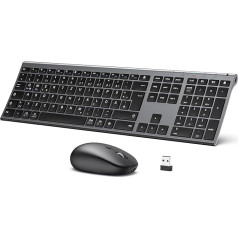
Wireless mouse and keyboard, works with only one USB receiver provided by both devices. Multimedia keyboard with Italian layout and numeric keypad, essential for office and game. Silent keys that can withstand at least 10 million strokes. Non-slip feet with height adjustable height. Dimensions: 43.9 x 12.6 x 2.5 cm Optical mouse with ergonomic and scroll-wheel Adjustable sensitivity (800 - 1200 - 1600 DPI) for optimal adjustment to the size of your monitor or TV. The buttons can withstand at least 10 million clicks. Dimensions: 11.5 x 6.6 x 3 cm Elegant and minimalist design, made of sturdy and durable materials. Technical support in Italian. Power supply: 1 x AAA (keyboard), 1 x AA (mouse) batteries not included. › See more product details; Product description Manual in Italian, data sheet and more information can be found on the official RiiTek Italia. This keyboard has the Italian QWERTY layout. Beware of foreign import versions: no Italian help and the special characters (@, #, ;, :) will not work properly with devices in Italian language. Compatible with: - Computer (Windows - Mac - Linux) - Mini PC (Android - Raspberry Pi) - Game console (PlayStation 3 - PlayStation 4 - Xbox One) - Smart TV of any brand and model excluded: * Sony (models without Android operating system) * Samsung C series (models UExxCxxxx - year of manufacture 2010) * Samsung D series (models UExxDxxxx - year of manufacture 2011) * Samsung EH Series (models UExxEHxxxx - 2011) * Samsung ES Series (models UExxES4xxx, UExxES5xxx, UExxES6xxx - 2012) To ensure your smart TV is compatible, you can conduct a simple experiment, take any USB keyboard and access one of the ports of your smart TV. When it works, you have the peace of mind that your smart TV is compatible. To improve signal transmission, we recommend a USB extension between the USB port and the USB receiver so that you can place the USB receiver on the keyboard. Some versions of the Youtube Smart TV app do not support external keyboard or mouse. In this case, open the web browser and connect directly to the YouTube website. On some Android versions, the configuration of an external keyboard is not provided, so the settings of the physical keyboard cannot access the settings from the Settings - Language and Input menu. To unlock access to settings, simply install the External Keyboard Helper Pro.; Product description Manual in Italian, data sheet and more information can be found on the official RiiTek Italia. This keyboard has the Italian QWERTY layout. Beware of foreign import versions: no Italian help and the special characters (@, #, ;, :) will not work properly with devices in Italian language. Compatible with: - Computer (Windows - Mac - Linux) - Mini PC (Android - Raspberry Pi) - Game console (PlayStation 3 - PlayStation 4 - Xbox One) - Smart TV of any brand and model excluded: * Sony (models without Android operating system) * Samsung C series (models UExxCxxxx - year of manufacture 2010) * Samsung D series (models UExxDxxxx - year of manufacture 2011) * Samsung EH Series (models UExxEHxxxx - 2011) * Samsung ES Series (models UExxES4xxx, UExxES5xxx, UExxES6xxx - 2012) To ensure your smart TV is compatible, you can conduct a simple experiment, take any USB keyboard and access one of the ports of your smart TV. When it works, you have the peace of mind that your smart TV is compatible. To improve signal transmission, we recommend a USB extension between the USB port and the USB receiver so that you can place the USB receiver on the keyboard. Some versions of the Youtube Smart TV app do not support external keyboard or mouse. In this case, open the web browser and connect directly to the YouTube website. On some Android versions, the configuration of an external keyboard is not provided, so the settings of the physical keyboard cannot access the settings from the Settings - Language and Input menu. To unlock access to settings, simply install the External Keyboard Helper Pro.; Manual in Italian, data sheet and more information can be found on the official RiiTek Italia. This keyboard has the Italian QWERTY layout. Beware of foreign import versions: no Italian help and the special characters (@, #, ;, :) will not work properly with devices in Italian language. Compatible with: - Computer (Windows - Mac - Linux) - Mini PC (Android - Raspberry Pi) - Game console (PlayStation 3 - PlayStation 4 - Xbox One) - Smart TV of any brand and model excluded: * Sony (models without Android operating system) * Samsung C series (models UExxCxxxx - year of manufacture 2010) * Samsung D series (models UExxDxxxx - year of manufacture 2011) * Samsung EH Series (models UExxEHxxxx - 2011) * Samsung ES Series (models UExxES4xxx, UExxES5xxx, UExxES6xxx - 2012) To ensure your smart TV is compatible, you can conduct a simple experiment, take any USB keyboard and access one of the ports of your smart TV. When it works, you have the peace of mind that your smart TV is compatible. To improve signal transmission, we recommend a USB extension between the USB port and the USB receiver so that you can place the USB receiver on the keyboard. Some versions of the Youtube Smart TV app do not support external keyboard or mouse. In this case, open the web browser and connect directly to the YouTube website. On some Android versions, the configuration of an external keyboard is not provided, so the settings of the physical keyboard cannot access the settings from the Settings - Language and Input menu. To unlock access to settings, simply install the External Keyboard Helper Pro.
|