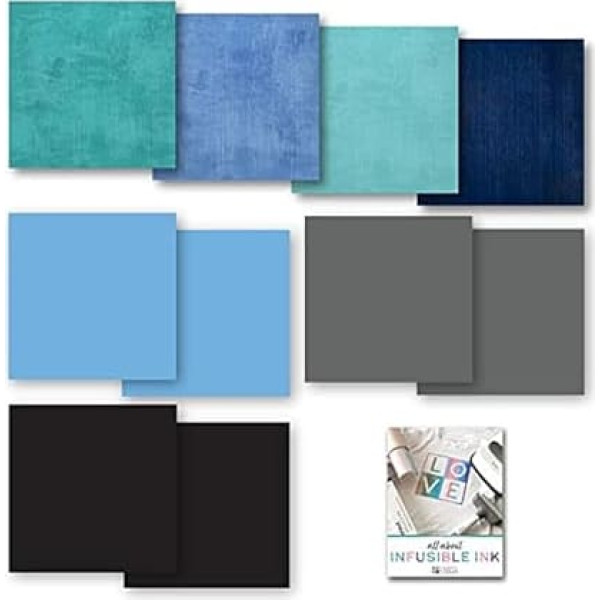
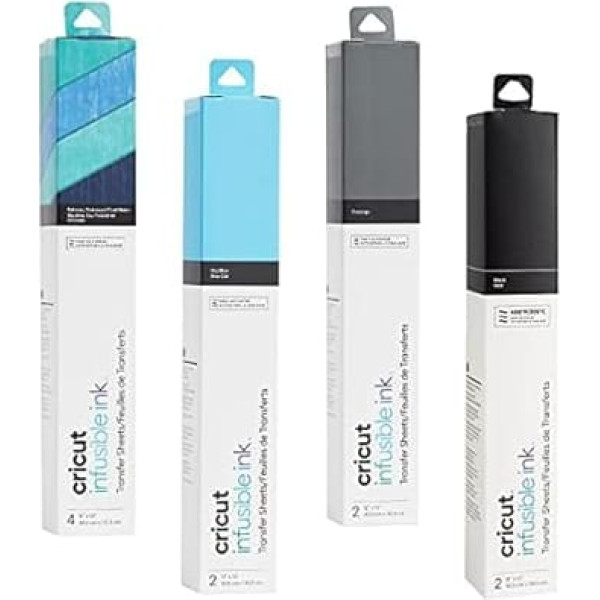
Transfer sheets: Cricut dyed ink provides professional results. Infusible Ink Bundle Kit contains three solid colors and a patterned sampler. Personalize t-shirts, tote bags, baby onesies, coasters. Find design inspiration and finished projects in Design Space or create a unique heat transfer sticker. EASY TO USE Design your design and cut Infusible Ink Transfer Sheets with Maker or Explore Air 2 machine. Apply heat to make your design penetrate into your Cricut blank with Cricut EasyPress 2 (or a heat press that reaches 400 degrees Fahrenheit). Note: The leaves are light sensitive and will be damaged by contact with water. Store in a dark, dry place. (Cricut blanks, machines and EasyPress2 sold separately). FOR BEGINNERS AND PROFESSIONALS Whether you're making shirts, coasters, or linen tote bag for yourself or someone special, use Cricut Infusible Ink for durable and professional DIY projects. Design Space Tutorial: Digital Book, Getting Started Guide, is an electronic format perfect for any Cricut user. You will learn more about Cricut tools, accessories and how to use Design Space. Getting Started Guide will be emailed as PDF (printed copies are not available). Includes 1 Infusible Ink Transfer Sheets in Grayiege, 1 Infusible Ink Transfer Sheets in Black, 1 Infusible Ink Transfer Sheets in Sky Blue, 1 Infusible Ink Transfer Sheets, Sampler Pack, in Distressed Cool Waters, 1 Digital eBook, Getting Started Guide (will be sent by email as printed copies are not available). › See more product details; Product description Customize t-shirts, bags, onesies and coasters with this Cricut Infusible Ink sample pack. Personalize any compatible Infusible Ink blank with a design, logo or favorite quote with your Cricut Explore Air 2 or Maker Machine. The sample pack includes sun tan transfer sheets, black transfer sheets, real yellow transfer sheets and rustic pattern transfer sheets. What is the Infusible Ink Process? Unlike an iron on or vinyl application where the artwork is attached to a base material with glue, an Infusible Ink heat transfer becomes one with the material itself. How it works: 1. Choose your materials. Choose Infusible Ink Transfer Sheets and a compatible Cricut blank. 2. Make your design. Cut infusible ink transfer sheets. 3. Apply heat. Fill your design into your Cricut blank with Cricut EasyPress 2 (or a heat press that reaches 400 degrees Fahrenheit). Note: The leaves are light sensitive and will be damaged by contact with water. Store in a dark, dry place. Digital Book, Getting Started Guide, is an electronic eBook that is perfect for any Cricut user. The DIY tutorials and project inspiration will prepare you to create your first project and beyond. Learn more about Cricut tools, accessories and how to use Design Space. Link to access the Getting Started Guide will be emailed (printed copies are not available).; Product description Customize t-shirts, bags, onesies and coasters with this Cricut Infusible Ink sample pack. Personalize any compatible Infusible Ink blank with a design, logo or favorite quote with your Cricut Explore Air 2 or Maker Machine. The sample pack includes sun tan transfer sheets, black transfer sheets, real yellow transfer sheets and rustic pattern transfer sheets. What is the Infusible Ink Process? Unlike an iron on or vinyl application where the artwork is attached to a base material with glue, an Infusible Ink heat transfer becomes one with the material itself. How it works: 1. Choose your materials. Choose Infusible Ink Transfer Sheets and a compatible Cricut blank. 2. Make your design. Cut infusible ink transfer sheets. 3. Apply heat. Fill your design into your Cricut blank with Cricut EasyPress 2 (or a heat press that reaches 400 degrees Fahrenheit). Note: The leaves are light sensitive and will be damaged by contact with water. Store in a dark, dry place. Digital Book, Getting Started Guide, is an electronic eBook that is perfect for any Cricut user. The DIY tutorials and project inspiration will prepare you to create your first project and beyond. Learn more about Cricut tools, accessories and how to use Design Space. Link to access the Getting Started Guide will be emailed (printed copies are not available).; Customize t-shirts, bags, onesies and coasters with this Cricut Infusible Ink sample pack. Personalize any compatible Infusible Ink blank with a design, logo or favorite quote with your Cricut Explore Air 2 or Maker Machine. The sample pack includes sun tan transfer sheets, black transfer sheets, real yellow transfer sheets and rustic pattern transfer sheets. What is the Infusible Ink Process? Unlike an iron on or vinyl application where the artwork is attached to a base material with glue, an Infusible Ink heat transfer becomes one with the material itself. How it works: 1. Choose your materials. Choose Infusible Ink Transfer Sheets and a compatible Cricut blank. 2. Make your design. Cut infusible ink transfer sheets. 3. Apply heat. Fill your design into your Cricut blank with Cricut EasyPress 2 (or a heat press that reaches 400 degrees Fahrenheit). Note: The leaves are light sensitive and will be damaged by contact with water. Store in a dark, dry place. Digital Book, Getting Started Guide, is an electronic eBook that is perfect for any Cricut user. The DIY tutorials and project inspiration will prepare you to create your first project and beyond. Learn more about Cricut tools, accessories and how to use Design Space. Link to access the Getting Started Guide will be emailed (printed copies are not available).
|










![Pack of 10 Dimmable G9 Halogen Bulbs, 40 W 230 V 2800 K G9 Halogen Bulbs for Oven Lamp, Ceiling Lights, Candlesticks [Energy Class F]](https://anete.shop/image/cache/catalog/ext4oc/90/19083374_-9007480-238x238.jpg)