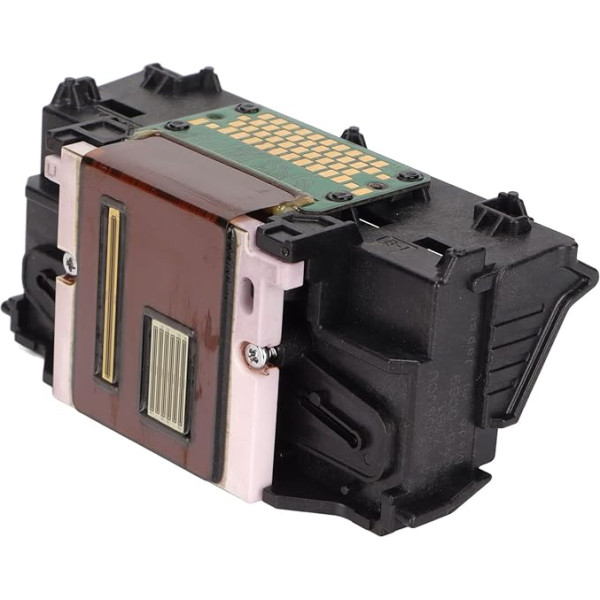
With protective case: prevent damage to the internal structure, the single black print head can replace the original print head to print pictures, photos and documents. Compatible printers: for TS5080 TS6020 TS6050 TS6051 TS6052 TS6080 TS5050 TS5051 TS5053 TS5055 TS5070 Note: Please make sure the printer works normally before installing a new printhead, otherwise the motherboard may be burned and the printer will refuse printing. Efficient: Each print head undergoes rigorous testing, and pressure test paper is used to test the effect of the print head. Replacement:This product is a perfect replacement for the old single black print head, which is very convenient to use. › See more product details; Product description Specification: Item Type:Print Head Material: ABS Model: QY6-0089. Function: printer print head Suitable for: TS5080 TS6020 TS6050 TS6051 TS6052 TS6080 TS5050 TS5051 TS5053 TS5055 TS5070 printers Use: Treatment method for error code 140B: 1. Delete print job. 2. Start, settings, management tools, services, search the printer spooler, double click it and click Stop in the General menu. 3. Then click Start, Run, enter Spol, open the folder PRINTER, delete all content and then click Start, print the Spooler printing service on the General tab. 4. Disconnect the printer for a minute, then connect it and restart the computer. Package list: 1 x print head.; Product description Specification: Item Type:Print Head Material: ABS Model: QY6-0089. Function: printer print head Suitable for: TS5080 TS6020 TS6050 TS6051 TS6052 TS6080 TS5050 TS5051 TS5053 TS5055 TS5070 printers Use: Treatment method for error code 140B: 1. Delete print job. 2. Start, settings, management tools, services, search the printer spooler, double click it and click Stop in the General menu. 3. Then click Start, Run, enter Spol, open the folder PRINTER, delete all content and then click Start, print the Spooler printing service on the General tab. 4. Disconnect the printer for a minute, then connect it and restart the computer. Package list: 1 x print head.; Specification: Item Type:Print Head Material: ABS Model: QY6-0089. Function: printer print head Suitable for: TS5080 TS6020 TS6050 TS6051 TS6052 TS6080 TS5050 TS5051 TS5053 TS5055 TS5070 printers Use: Treatment method for error code 140B: 1. Delete print job. 2. Start, settings, management tools, services, search the printer spooler, double click it and click Stop in the General menu. 3. Then click Start, Run, enter Spol, open the folder PRINTER, delete all content and then click Start, print the Spooler printing service on the General tab. 4. Disconnect the printer for a minute, then connect it and restart the computer. Package list: 1 x print head.
|







![Pack of 10 Dimmable G9 Halogen Bulbs, 40 W 230 V 2800 K G9 Halogen Bulbs for Oven Lamp, Ceiling Lights, Candlesticks [Energy Class F]](https://anete.shop/image/cache/catalog/ext4oc/90/19083374_-9007480-238x238.jpg)